

“I will run the tests again. I expect nothing. I am a leaf on the wind.”— An LLM while coding (Rohit Krishnan)
AI don’t really understand their own actions. They optimise token prediction without comprehension. They are but a leaf on the wind indeed.
But what’s interesting is that same limitation, forces us to articulate our thinking with a written clarity we rarely achieve when teaching humans. And in doing so, we’re discovering that SOPs aren’t about standardisation at all.
They’re teaching artefacts.
TL;DR: Claude Skills as SOPs for Agents
Anthropic recently released Claude Skills —a framework for packaging reusable workflows that Claude can execute on-demand. Think of them as Standard Operating Procedures for AI agents.
What is a Skill?
- A folder containing a
skill.mdfile with instructions, scripts, and resources - Claude loads it automatically when relevant to your request
- Works in Claude chat, Claude Code, and via API
- Composable (skills can work together) and portable (use anywhere)
Why it matters:
Just like humans need SOPs to reduce variability and ensure quality, AI agents need them even more. The quality of an LLM’s output is directly proportional to the quality of context you provide—this is context engineering. Skills are structured, reusable context packages.
The industry convergence:
- Anthropic: Claude Skills
- OpenAI: GPTs/Apps
- Google: Gemini CLI Extensions
All three major AI labs are independently building similar frameworks. The pattern is clear: chat interfaces are evolving from simple Q&A tools into platforms for hosting personal agents that can execute complex, multi-step workflows.
Anatomy of a Skill:
skill.md- The master instruction file (name, description, process steps)- Scripts - Python code or other executables
- Resources - Additional files the skill needs
- Best practice: Use code over verbose English when possible (more token-efficient)
A Claude Skill is essentially a structured SOP that Claude can execute. The skill file itself tells Claude:
- When to activate - The trigger conditions
- What to do - The step-by-step procedure
- How to do it - The tools and commands to use
- What to return - The expected outputs
The SOP Reframe
Traditional thinking says SOPs are about standardisation—making processes uniform and repeatable. Document the steps, ensure consistency, reduce errors. That’s the industrial-era mental model.
That’s wrong.
When you write an SOP for an employee, you’re not documenting a process—you’re teaching them how to think about a class of problems. The SOP is a compressed transfer of your decision-making framework, your mental models, your tacit knowledge about when rules apply and when they don’t.
Same with AI. When you create a Claude Skill, you’re not automating a task—you’re teaching Claude your decision-making process.
I’ve started thinking of SOPs differently: “Show Other People.”
Whether those “people” are junior employees or AI agents doesn’t matter. The exercise is identical: take tacit knowledge and make it explicit enough that someone else can replicate your thinking.
When I build Claude Skills now, I’m not writing procedures—I’m abstracting my thinking into teachable principles. Each Skill is a mini-course in “how Oisín approaches X problem.” Content repurposing. Research synthesis. Video transcript processing.
The practical implication: I’m building Skills for everything. Not to replace thinking, but to bring the right context to hand faster. SOPs as leverage.
Claude Skills: Teaching Through Structure
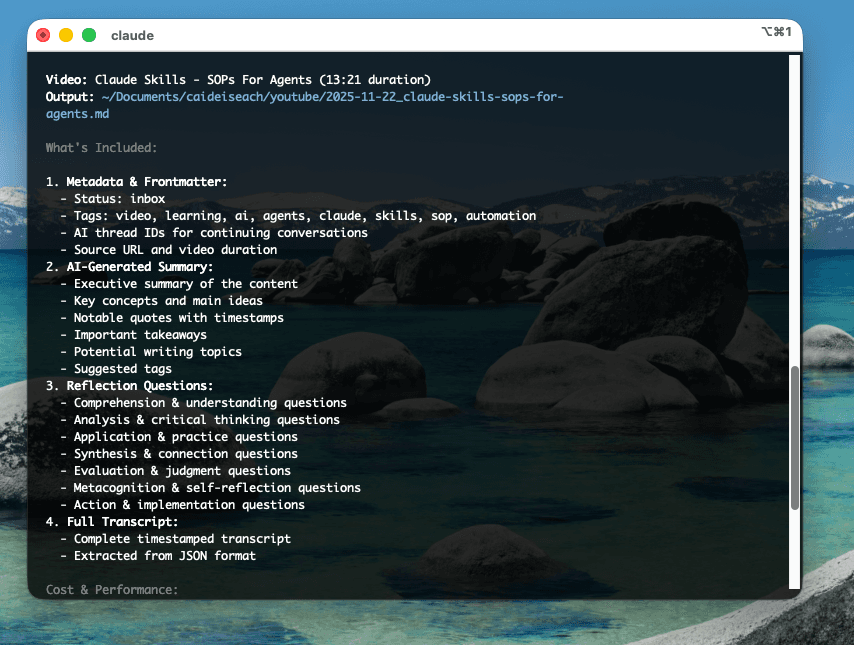
Here’s a real example from my workflow - a Skill for processing video/audio content into structured notes:
name: extract-content-summarize description: Extract structured insights and generate reflection questions from video/audio transcripts.
Here is what the trigger can look like:
## When to Activate This Skill
- User wants to process video/audio content into structured notes- User requests “summarize this video” or “extract insights from this podcast”- Task involves creating zettelkasten notes from media content- User wants reflection questions or study materials from content- User provides transcript and wants comprehensive analysis- User says “process this for my knowledge base”
The Skill orchestrates a complete workflow:
- Download audio (yt-dlp for YouTube, direct for files)
- Transcribe (using Whisper)
- Analyse in parallel (summary + reflection questions via Gemini/Claude)
- Assemble final document (markdown with front-matter)
The key insight: Each step is a tool call. The Skill is teaching Claude how to orchestrate tools to achieve an outcome.
Let me show you how this works in practice. Here’s the Skill I use daily:
Purpose: Transform video/audio content into structured zettelkasten (Obsidian fanboy) notes with summaries, quotes, reflection questions, and full transcripts.
The Workflow:
# Step 1: Acquire content yt-dlp -x --audio-format mp3 "youtube.com"
# Step 2: Transcribe ~/.claude/tools/audio_transcription/main.py audio.mp3 --output tmp/transcript.json
# Step 3: Parallel AI analysis # 3a. Content extraction python openrouter_call.py \ --model gemini-2.5-pro \ --system ‘[{”type”: “file”, “path”: “../skills/extract-content-summarize/prompts/content_extractor.md”}]’ \ --user ‘[{”type”: “text”, “content”: “Analyze this transcript:\n\n”}, {”type”: “file”, “path”: “tmp/transcript.json”}]’ \ --output tmp/summary.md
# 3b. Reflection questions (parallel) python openrouter_call.py \ --model gemini-2.5-pro \ --system ‘[{”type”: “file”, “path”: “../skills/extract-content-summarize/prompts/reflection_generator.md”}]’ \ --user ‘[{”type”: “text”, “content”: “Generate questions:\n\n”}, {”type”: “file”, “path”: “tmp/transcript.json”}]’ \ --output tmp/questions.md
# Step 4: Assemble final document python markdown_builder.py \ --title “Video Title” \ --frontmatter ‘{”status”: [”inbox”], “tags”: [”video”, “learning”]}’ \ --body ‘[ {”header”: “Summary”, “type”: “file”, “path”: “tmp/summary.md”}, {”header”: “Reflection Questions”, “type”: “file”, “path”: “tmp/questions.md”}, {”header”: “Transcript”, “type”: “json”, “path”: “tmp/transcript.json”, “keys”: [”transcript”]} ]’ \ --output ~/Documents/obsidian/inbox/2025-10-29_video-title.md
What makes this a good SOP/Skill:
- Composable tools - Each step is independent and reusable
- Parallel processing - Run AI analyses simultaneously for efficiency
- Thread tracking - Save conversation IDs for follow-up
- Structured output - Consistent zettelkasten format
- Cost awareness - Choose appropriate models for each task
The teaching artefact: This Skill doesn’t just automate—it teaches Claude (and any human reading it) my entire workflow for processing learning content: the decision points, the tool choices and the output structure.
*One little feature I particularly like about this is that the AI itself that’s managing doesn’t get clogged with all the content, so it’s very similar to having sub-agents, but something that works a little bit better, generally, across other models beyond Claude (I’m looking at you, Gemini Flash 2.5).
It is time to write SOPs for AI
The Teaching Imperative
This reframes the entire prompt engineering debate. It’s not about clever tricks. It’s about teaching. Can you articulate your decision-making process clearly enough that an AI (or intern) can follow it?
The best SOPs/Skills/Workflows share these properties:
- Abstraction - They capture the general principle, not just the specific instance
- Composability - They can be combined with other workflows
- Clarity - They make decision points explicit
- Portability - They work across tools and platforms
- Teachability - A human can learn from them
When you write a Skill, ask: “Could a smart intern execute this? Could they understand why each step matters?”
If yes, you’ve created a teaching artefact. If no, you’ve just documented a procedure.
Show Other People
The question isn’t whether AI will automate your work. It’s whether you can articulate your thinking clearly enough to teach it—to AI, to colleagues, to your future self.
Show other people. Make it explicit. Make it teachable. Make it portable.
That’s the art.